


Service Desk Automation: Solving “Silent Suffering” with Telemetry
The Operational Bottleneck: The “Iceberg” of Enterprise IT
In 2026, the primary failure of enterprise technology support is not that we fail to resolve tickets; it is that we only see a fraction of the actual problems. We are managing an iceberg.
If your service desk receives 500 tickets a week regarding “System Slowness,” you might pat yourself on the back for resolving them within the Service Level Agreement (SLA). However, operational reality suggests that for every one employee who takes the time to fill out a form, wait in a queue, and speak to an agent, ten other employees simply tolerate the issue. They reboot their machine, switch to their personal phone hotspot, or simply work slower.
This phenomenon is “Silent Suffering.” It destroys productivity without ever generating a metric in your ticketing system.
The traditional “break-fix” model is obsolete because it relies on the user to be the monitoring tool. The strategic pivot for service desk automation in 2026 is moving from reactive waiting to proactive discovery. We must use endpoint telemetry and process mining to identify friction points and resolve them before the user even realizes a ticket is necessary.
Service Desk Automation — The Detection Architecture
To solve Silent Suffering, you must first detect it. This requires integrating your service desk automation layer directly with your endpoint management and application performance monitoring tools. You are no longer waiting for a human to complain; you are listening for the machine to report a fault.
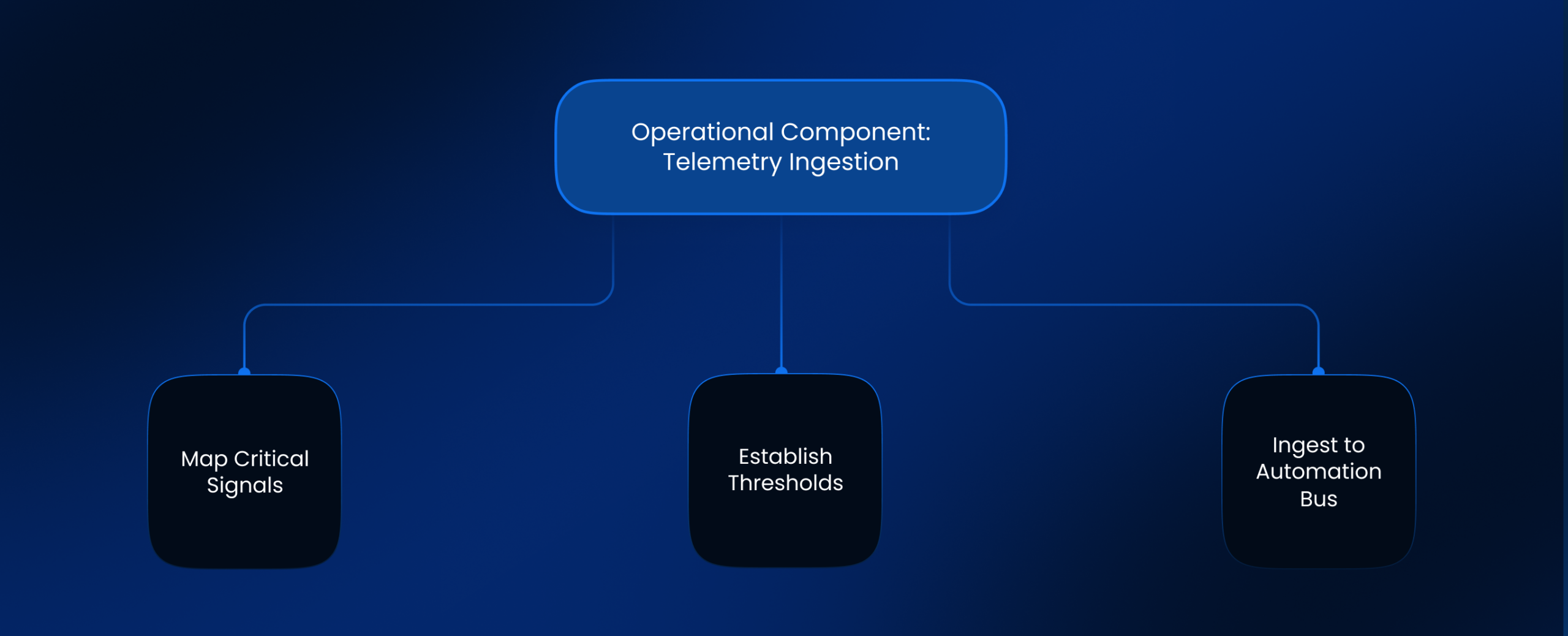
Operational Component: Telemetry Ingestion
You likely already have the data. It sits in your endpoint logs, network traffic analyzers, and application crash reports. The challenge is feeding this data into the automation engine.
Steps to Detect:
- Map Critical Signals: Identify the top 5 technical indicators of lost productivity (e.g., High Memory Usage > 90% for 1 hour, Zoom Jitter > 50ms, Application Crash Event ID 1000).
- Establish Thresholds: Define the difference between a transient spike and a chronic issue.
- Ingest to Automation Bus: Configure the monitoring tool to send a webhook to your service desk automation platform when a threshold is breached.
Dependencies:
- A robust Endpoint Detection and Response (EDR) or Digital Employee Experience (DEX) agent installed on user devices.
- Software support teams willing to define what constitutes a “crash” versus a “force quit.”
Failure Points:
- Signal Noise: If thresholds are too low, the service desk automation system creates thousands of incidents for minor CPU spikes, overwhelming the backend.
- Privacy Pushback: Employees may view deep telemetry on their laptop performance as surveillance if not clearly communicated as management support for their productivity.
Service Desk Automation — The Remediation Loop
Once a signal is detected, the system must act. This is where service desk automation transitions from a monitoring tool to an active agent of repair.
Operational Component: The Silent Fix
The goal is to execute a script that resolves the root cause without disrupting the employee.
Steps to Remediate:
- Trigger Evaluation: The automation engine receives the crash signal (e.g., “Excel detects plugin conflict”).
- Check Context: Is the user currently presenting in a meeting? (Check Calendar status). If yes, pause.
- Execute Remediation: Push a background script to disable the conflicting plugin or clear the cache.
- Notify User: Send a non-intrusive notification: “We noticed Excel was unstable. We have cleared your cache to fix it. No action needed.”
Dependencies:
- Service desk software solutions that allow for API-triggered workflows, not just user-triggered ones.
- A library of verified PowerShell or Bash scripts for common fixes.
Failure Points:
- The “Reboot” Risk: An automated fix that forces a restart while the user is working on an unsaved document causes more damage than the original bug.
- Permissions: The automation agent lacks the local administrative privileges to restart the specific service causing the issue.
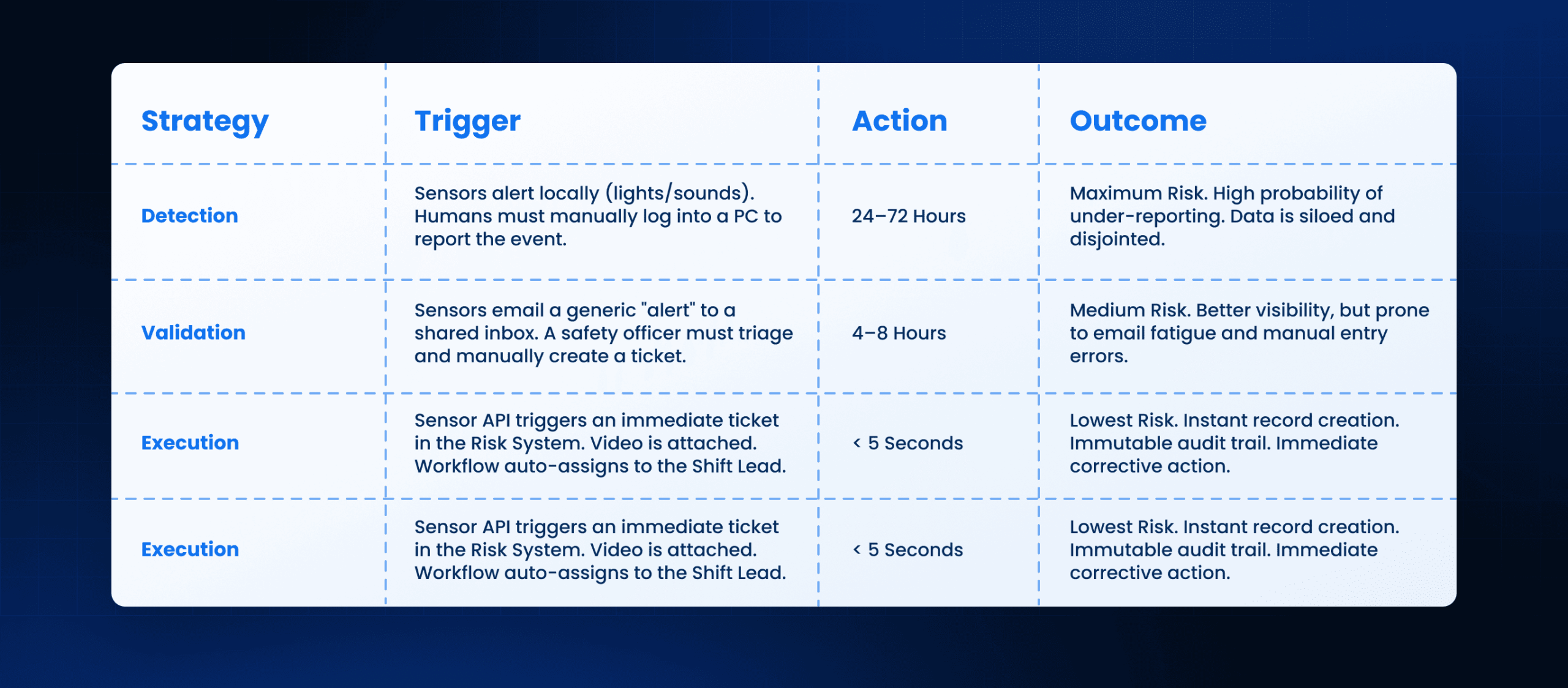
Workflow States for Proactive Remediation
Service Desk Automation — Governance and Ownership
Moving to proactive service desk automation changes the fundamental relationship between IT and the business. You are reaching into the user’s device uninvited to fix things. This requires strict governance to ensure management software services do not become a source of disruption.
Operational Component: The “Do No Harm” Policy
You must establish rules of engagement. Automated fixes should never be aggressive during business hours unless the device is unusable.
Steps to Govern:
- Risk Categorization: Classify every automated script as Low Risk (Clear Cache), Medium Risk (Restart Service), or High Risk (Reboot Device).
- Approval Gates: High Risk actions always require a “Human in the Loop” or explicit user consent via a pop-up prompt.
- Rollback Mechanism: Every automated fix must have an “Undo” script ready in case the remediation causes a new conflict.
Dependencies:
- Manage IT support leadership must sign off on the specific remediation scripts.
- Service delivery software must log every automated action for audit purposes.
Failure Points:
- Script Drift: An automated fix that worked for Windows 10 breaks machines running Windows 11 because the script was not updated.
- Notification Fatigue: If the system notifies the user every time it fixes a minor cookie error, the user will disable notifications.
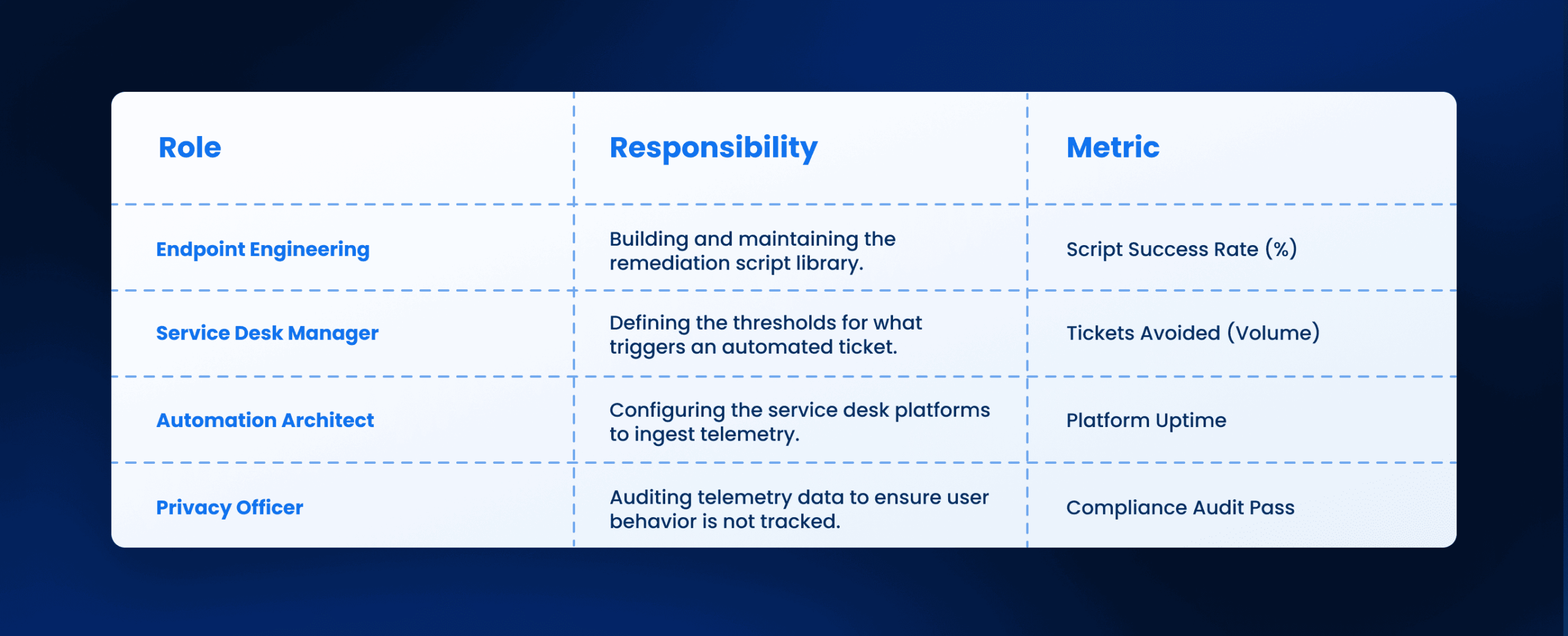
Ownership of Proactive Automation
Service Desk Automation — Integration Strategy
To achieve this at scale, your service desk automation architecture cannot be a silo. It must connect the monitoring layer (The Eyes) to the ticketing layer (The Brain) and the infrastructure layer (The Hands).
Integrating Service Desk Platforms
Modern service desk platforms are no longer just repositories for forms. They are orchestration hubs. You must configure your platform to accept API inputs from your monitoring tools as “Incidents,” but mark them with a specific “Source: Telemetry” tag. This allows you to report separately on user-reported issues vs. machine-reported issues.
The Role of Service Desk as a Service
If you utilize a managed service provider or service desk as a service, you must renegotiate the contract. Most providers are paid per ticket. If you implement service desk automation that reduces ticket volume by 30%, their revenue drops. You must shift the contract to an “Endpoint Health” outcome-based model, incentivizing them to deploy more proactive scripts rather than answering more phones.
Scaling Service Desk Software Solutions
As you scale, the volume of data will explode. Service desk software solutions that charge by the record or by storage will become cost-prohibitive if you log every single telemetry event. You must implement a “Throttling” logic at the ingestion point. Only create a ticket if the same event happens 3 times in 24 hours, or if the severity is Critical.
Service Desk Automation — Future Readiness
The future of service desk automation is predictive, not just proactive. By analyzing the trends in software support telemetry, the system should predict a hard drive failure two weeks before it happens.
Steps to Predict:
- Trend Analysis: The system notes that a specific laptop model has shown a 20% increase in thermal throttling.
- Preventative Replacement: The system automatically logs a request to ship a new fan or a new device to the user before the old one dies.
- User Communication: “Your device is showing signs of age. Would you like to schedule a replacement?”
This level of management support transforms IT from a utility that fixes broken things into a partner that ensures continuous work.
How Leena AI Operationalizes This
At Leena AI, we operationalize service desk automation by acting as the intelligent orchestration layer between your telemetry and your resolution. We do not just log the ticket; we manage the lifecycle of the silent fix.
Our Operational Approach:
- Intelligent Ingestion: We connect with your existing endpoint monitoring tools to ingest performance signals, filtering out the noise to focus on actionable friction points.
- Autonomous Resolution: Our platform triggers verified remediation workflows that execute in the background, resolving issues like password lockouts or application hangs without human agent involvement.
- Proactive Outreach: If a fix requires user action (like a reboot), Leena AI reaches out to the employee via their preferred chat channel to schedule the best time, ensuring high compliance without disruption.
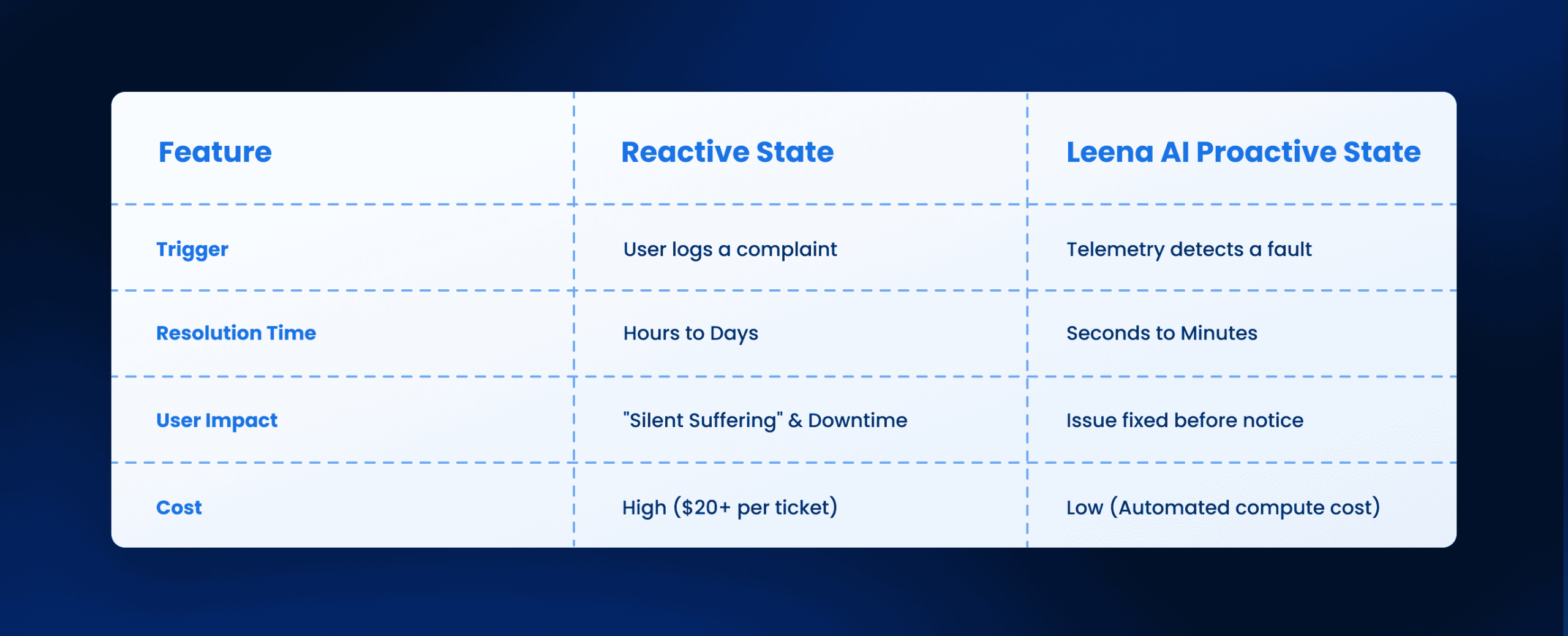
Operational State Before vs. After Leena AI
Conclusion: Execution Outcomes
The era of waiting for the phone to ring is over. Service desk automation in 2026 demands a shift to proactive discovery.
Monday Morning Next Steps:
- Audit Your Telemetry: Check if your current endpoint tools are configured to export logs to your ticketing system.
- Identify the Top 3 “Silent” Killers: Look at crash logs to find the high-volume errors that users are not reporting.
- Pilot One Script: Build a single automated remediation workflow (e.g., “Clear Teams Cache”) and deploy it to a small pilot group to measure the impact.
Stop rewarding your team for fixing tickets. Start rewarding them for preventing tickets from ever being created.
Frequently Asked Questions
What is the difference between service desk automation and a chatbot?
A chatbot converses with a human to answer questions. Service desk automation interacts with systems and data to execute tasks, often without any human conversation taking place.
How does process mining improve service desk automation?
Process mining analyzes the digital footprints of workflows. It identifies where users are getting stuck or where applications are crashing, providing the data needed to build targeted automation scripts.
Will service desk automation replace support staff?
It replaces the repetitive work of “Level 1” support, such as password resets and cache clearing. This frees up staff to focus on complex “Level 2” and “Level 3” engineering problems.
How do we prevent automated fixes from disrupting users?
You must implement “User Context Awareness.” The automation should check if the user is in a meeting, presenting, or active on the device before running any script that impacts performance.
Can we use service desk automation for legacy software?
Yes, but it is harder. For legacy software support, you may need to use Robotic Process Automation (RPA) screen-scraping tools rather than direct APIs to execute the fixes.
What is the biggest risk in deploying proactive remediation?
The biggest risk is a “False Positive” where the automation aggressively “fixes” a machine that wasn’t broken, potentially closing applications that the user was using intentionally.



