

Introduction
Most enterprise AI advises. The next generation acts – it files the PTO request, runs the onboarding across HR, IT, and Finance, and starts on a trigger instead of a prompt. The moment AI moves money and grants access, a wrong step gets expensive.
So an architecture for acting AI has to do three things at once: give AI Colleagues real autonomy, keep it on rails you can audit, and get them live fast – 45 days, not the six-to-eighteen-month slog the rest of the category runs on.
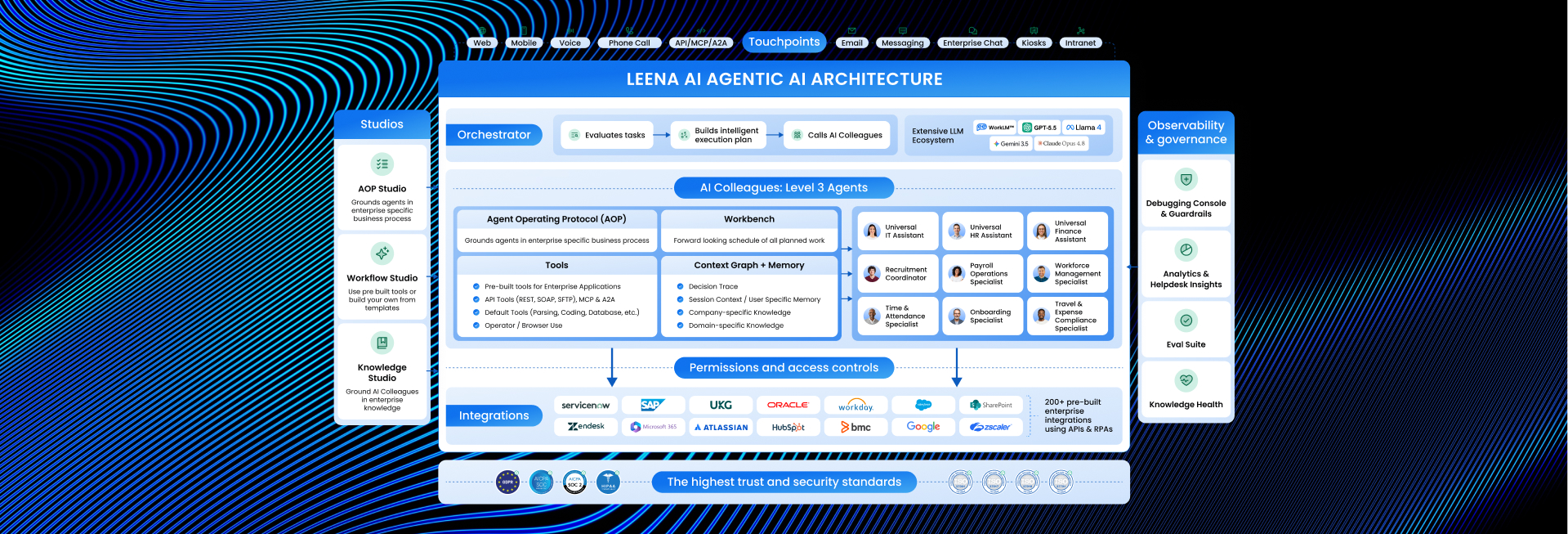
Here’s how we built it. Eight layers, each earning its place.
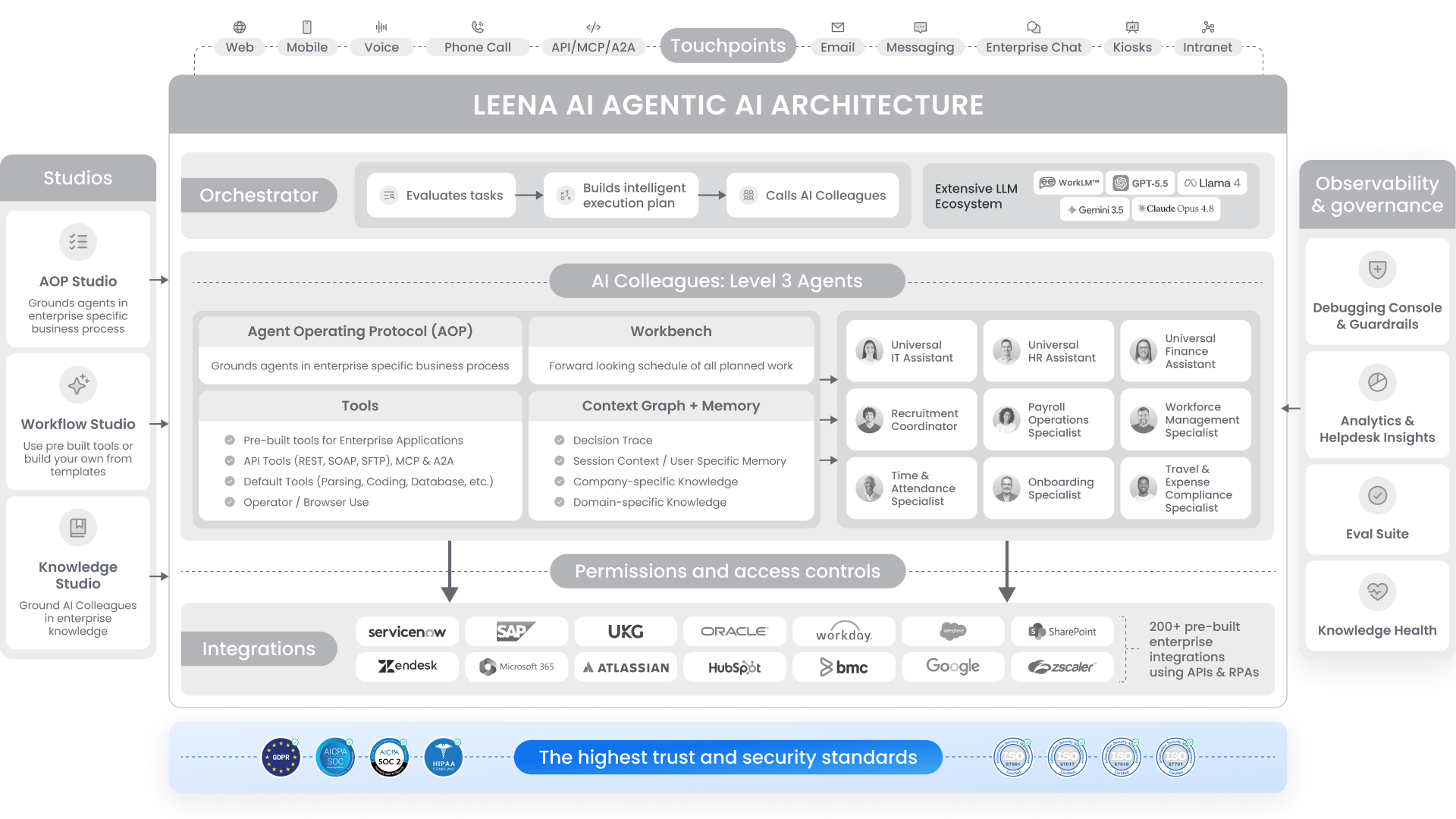
The architecture at a glance
- Touchpoints – where your people meet Leena
- Orchestrator – the planning and coordination engine
- AI Colleagues – the digital workers (AOPs, Tools, Workbench, Context Graph & Memory)
- Studios – where you build them (Workflow, AOP, Knowledge)
- Observability & Governance – see every step, govern every step
- Permissions & Access Controls – your access model, enforced at runtime
- Integrations – 200+ systems, pre-integrated
- Trust & Security – built in, not bolted on
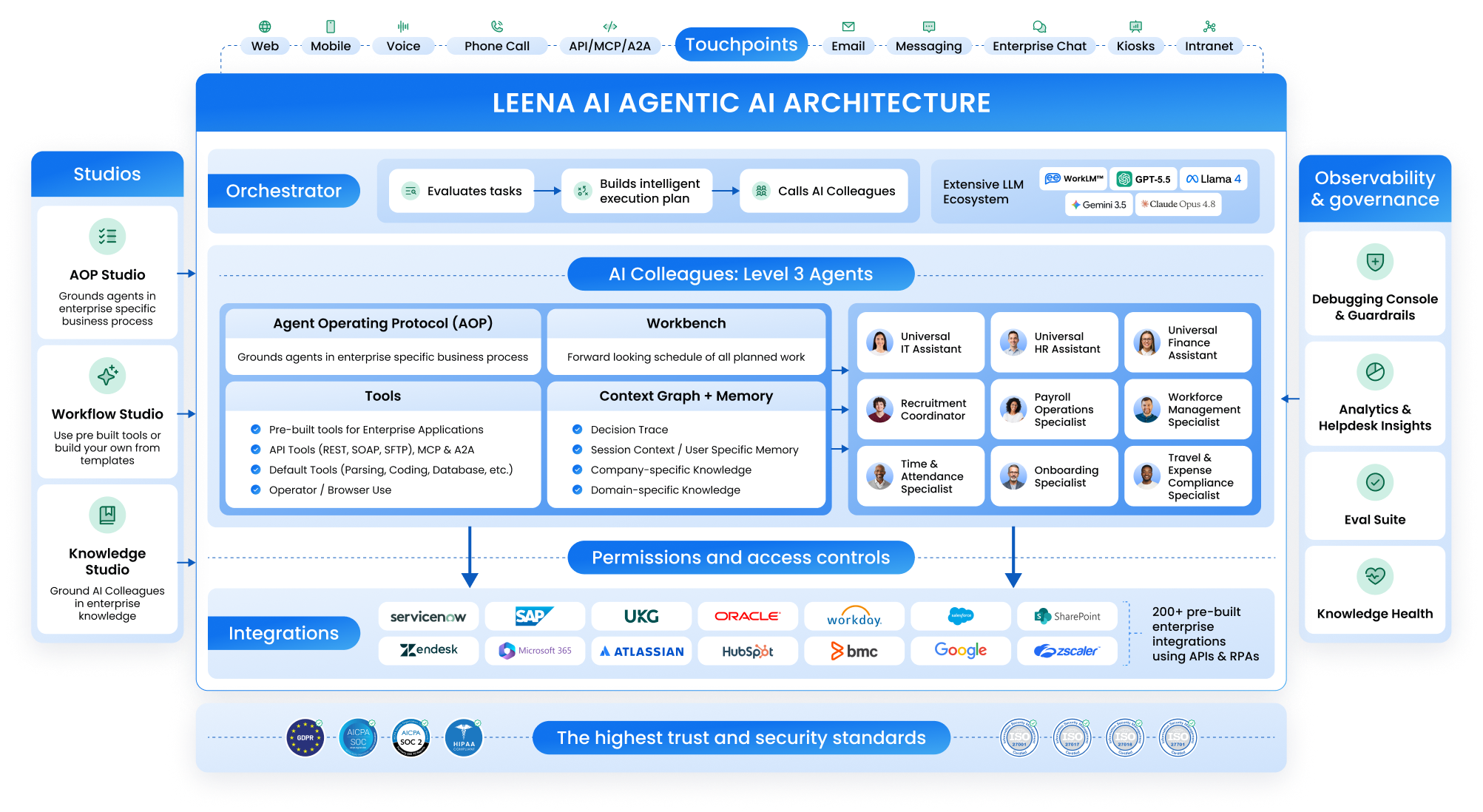
1. Touchpoints – meet your people where they work
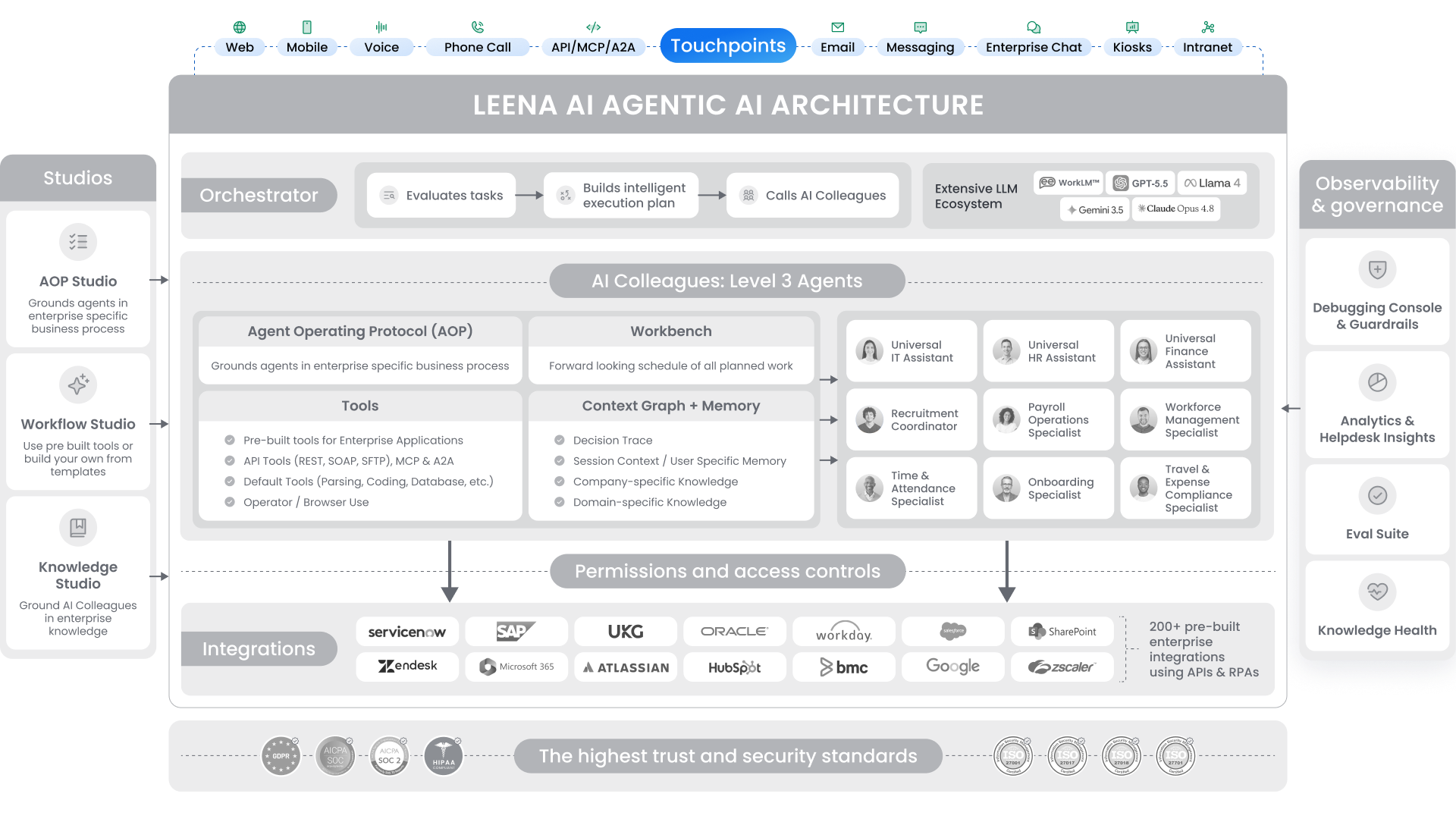
Touchpoints are the surfaces your people use to reach Leena. They sit at the top of the architecture – the front door to every AI Colleague, channel-agnostic from day one.
Adoption dies when employees have to change how they work to use your AI. So we don’t ask them to. HQ lives in Slack and Teams. Field teams live in WhatsApp. Frontline workers in healthcare, retail, and manufacturing don’t have a laptop – they have ten minutes between shifts and a kiosk on the floor. Drivers and technicians just want to call. So they call, and Leena picks up. No app, no internet.
Out of the box:
- Web – chat and full web app
- Mobile – a dedicated app, branded as your Colleague, not “Leena AI” in the store
- Voice – talk instead of type, across web, desktop, mobile, and chat
- Phone Call – dial-in IVR for the workforce that isn’t at a desk
- Messaging – SMS, WhatsApp, and more
- Enterprise Chat – Microsoft Teams, Slack, Zoom
- Intranet – your internal portals
- Kiosks – live today on hospital and factory floors
- API, MCP, A2A – trigger-based invocation and agent-to-agent interoperability
Every Touchpoint routes into the same Orchestrator and the same Colleagues. Reach one from Slack, a phone call, or a kiosk and you get the same enterprise knowledge, the same understanding of who you are, and the same governed behavior. (To be precise: a Colleague carries your knowledge, permissions, and context across channels – it doesn’t splice one live kiosk chat onto your web chat.) New channels are minimal overhead: no re-platforming, no re-training.
Don’t see the touchpoint you need? We’ll build it. A standing commitment, not a roadmap maybe.
2. Orchestrator – one prompt in, a finished plan out
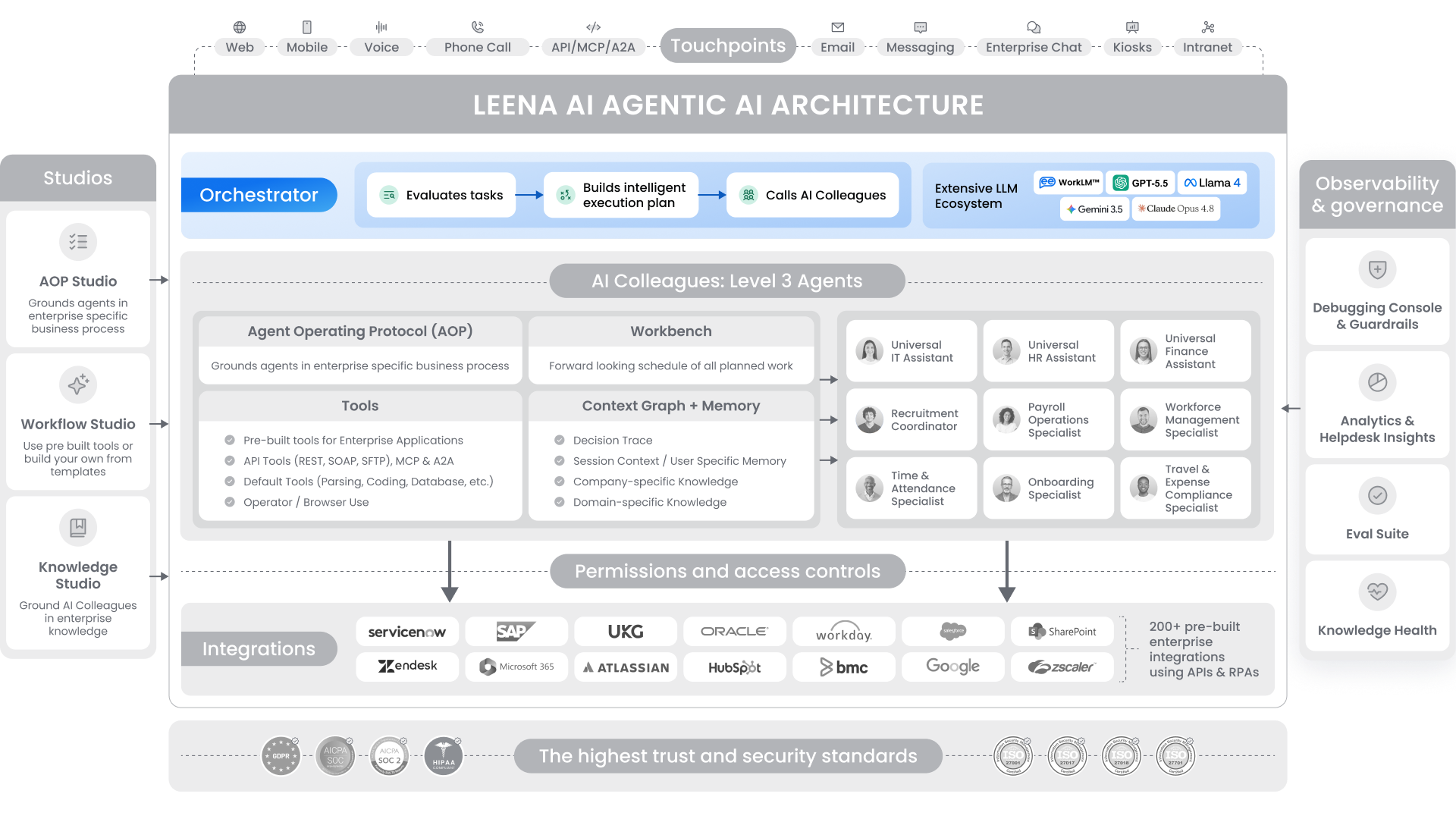
Every request lands here first – typed, spoken, fired over REST, invoked via MCP, handed off through A2A, or kicked off by a schedule or event. Its job: turn the ask into a plan, call the right Colleagues, finish the work.
The Orchestrator is model-agnostic by design. It runs on whichever frontier model fits – GPT-5.5, Claude Opus 4.7, Gemini 3.5, Llama 4, Grok 4.3, or our proprietary WorkLM – and stays in charge regardless. We’re not a model company, and as better models ship, we adopt them.
What matters more than the model is the expertise on top of it. The models we run are grounded in how enterprise work flows: a PR precedes a PO, a new hire needs HR, IT, and Finance in lockstep, offboarding closes access before payroll. Consumer-grade reasoning doesn’t know that. We make sure whatever model is driving does.
A single prompt – “I’m moving to the Austin office, get me set up” – becomes a coordinated plan across HR, IT, and Finance, live in minutes. The loop:
- Hears. One input, any channel.
- Reasons. Reads intent; pulls user context, permissions, knowledge, and prior decisions from the Context Graph. A primary LLM drafts; an evaluator LLM checks before anything commits.
- Plans. Builds an execution plan grounded in your AOPs – explicit and deterministic. The LLM reasons within the rails; it doesn’t invent them.
- Delegates. Routes sub-tasks across 1,000+ pre-built tools spanning 200+ enterprise systems, pre-integrated – plus your own agents, exposed via MCP.
- Acts. Calls APIs, MCPs, or browser flows. Holds state across long runs – pause at an approval, resume where it left off. Every step trace-logged.
The payoff is consistency you can audit: same AOP, same rails, every run. And because the people closest to the work write those AOPs in plain English, change happens where the work lives – no engineering ticket.
3. AI Colleagues – persistent digital workers, not chatbots
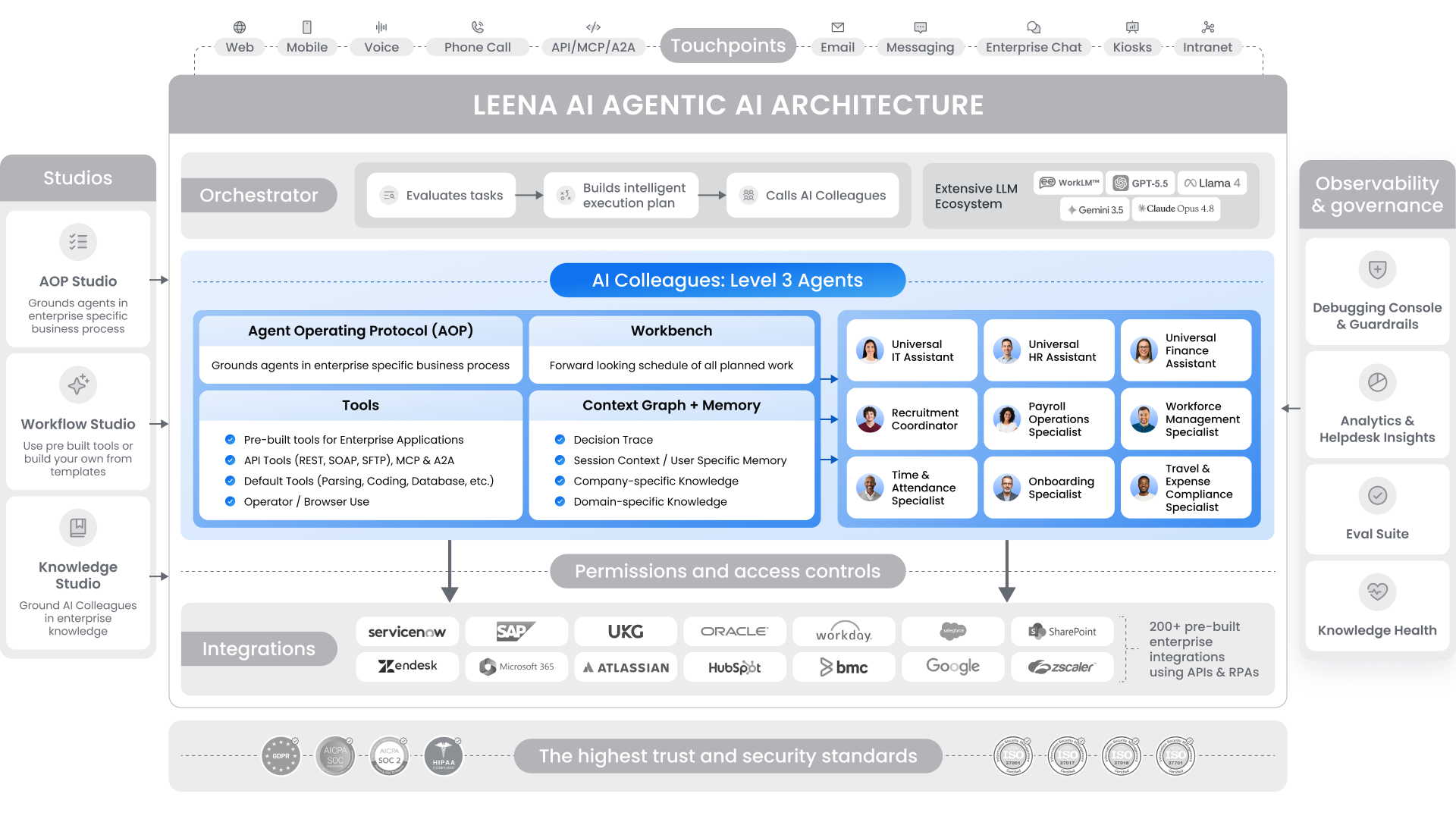
Think of an AI Colleague as an individual-contributor role in your back office – an IT Helpdesk Agent, an AP Analyst, an HR Ops Specialist. It has a job description, a scope, and a human manager for the grey areas it can’t resolve. It does real work in real systems, and gets sharper at your business the longer it’s there.
Four components make it more than a wrapper around a model.
3.1 AOPs – the playbook a Colleague runs
AOPs – Agent Operating Protocols – are to Colleagues what SOPs are to humans. An AOP mirrors how your teams already think: steps, owners, approvals, SLAs, fallbacks. No flowchart canvas, no dev framework.
This is the deterministic core. The process graph is written down – what happens, in what order, with what fallbacks. The LLM reasons inside those rails, not over them. That’s what keeps behavior identical on Tuesday and Sunday, which is exactly what SLAs, compliance, and audit demand.
3.2 Tools – how a Colleague actually does things
Tools are the atomic actions a Colleague takes: read an email, fetch a leave balance, file a ticket, post a journal entry. We ship 1,000+ pre-built across 200+ systems – Workday, SAP, ServiceNow, Salesforce, Oracle, UKG, Coupa, BambooHR, Gmail, Outlook, Slack, and more.
Tools are deterministic and validated – each knows exactly which system it hits, which fields it can touch, and how to check the response. No hallucinated API calls. Every Colleague also gets foundational tools: document parsing, knowledge search, code execution, notifications, approvals, and browser use – so when no API exists, it logs in and clicks through like a person.
3.3 Workbench – what makes Colleagues always-on
Most agents sit in a chat window waiting. Colleagues don’t. They’re subscribed to time and to your systems. The work shows up; they run it. Two ways it lands:
- Schedules – run any AOP on any cadence (last Friday of the month, daily at 3 AM, quarterly audits). Time-zone-aware.
- System triggers – fire on events: new ticket, new hire in the HRIS, file uploaded, status changed. Picked up the instant it lands.
Once live, runs stay stateful. A Colleague can pause – on an approval, a reply, an external response – then resume exactly where it left off. That’s how a payroll close that used to die at the first stuck approval now finishes the moment it clears. Humans aren’t the bottleneck; they’re the judgment layer.
3.4 Context Graph & Memory – how a Colleague knows your business, and learns it
Most enterprise AI sounds smart and acts dumb: it either knows your policies and can’t act, or acts and doesn’t know you. Memory and the Context Graph fix that.
Memory is what a Colleague knows. Five elements decide what it pulls and acts on:
- Domain knowledge – the trade itself, pre-trained into the model. How HR, AP, and procurement actually work.
- Company knowledge – your policies, SOPs, KB, contracts, connected from SharePoint, Confluence, ServiceNow, Box, Drive, and data lakes. Pre-indexed centrally, so retrieval is milliseconds – not at the mercy of a slow API.
- User memory – who it’s working with: role, authority, history, pulled live from HRMS, ITSM, ERP, CRM.
- Session context – live working memory of the task, held across multi-step workflows so nothing drops on a handoff.
The Context Graph is what a Colleague learns by doing. When reality breaks the playbook – a missing PO, a Day-1 access ask – it pauses and asks the human owner two questions: what’s the call, and is this a one-time exception or a precedent? The answer is written in as structure: exception → decision → conditions → actors → systems. Next time the pattern appears, the Colleague applies the precedent in seconds. Anything different, it escalates again.
That’s explicit, inspectable learning you can show a regulator – not “learning” buried in model weights. Your second hundred cases run faster than your first ten, and you can prove why.
4. Studios – where AI Colleagues get built
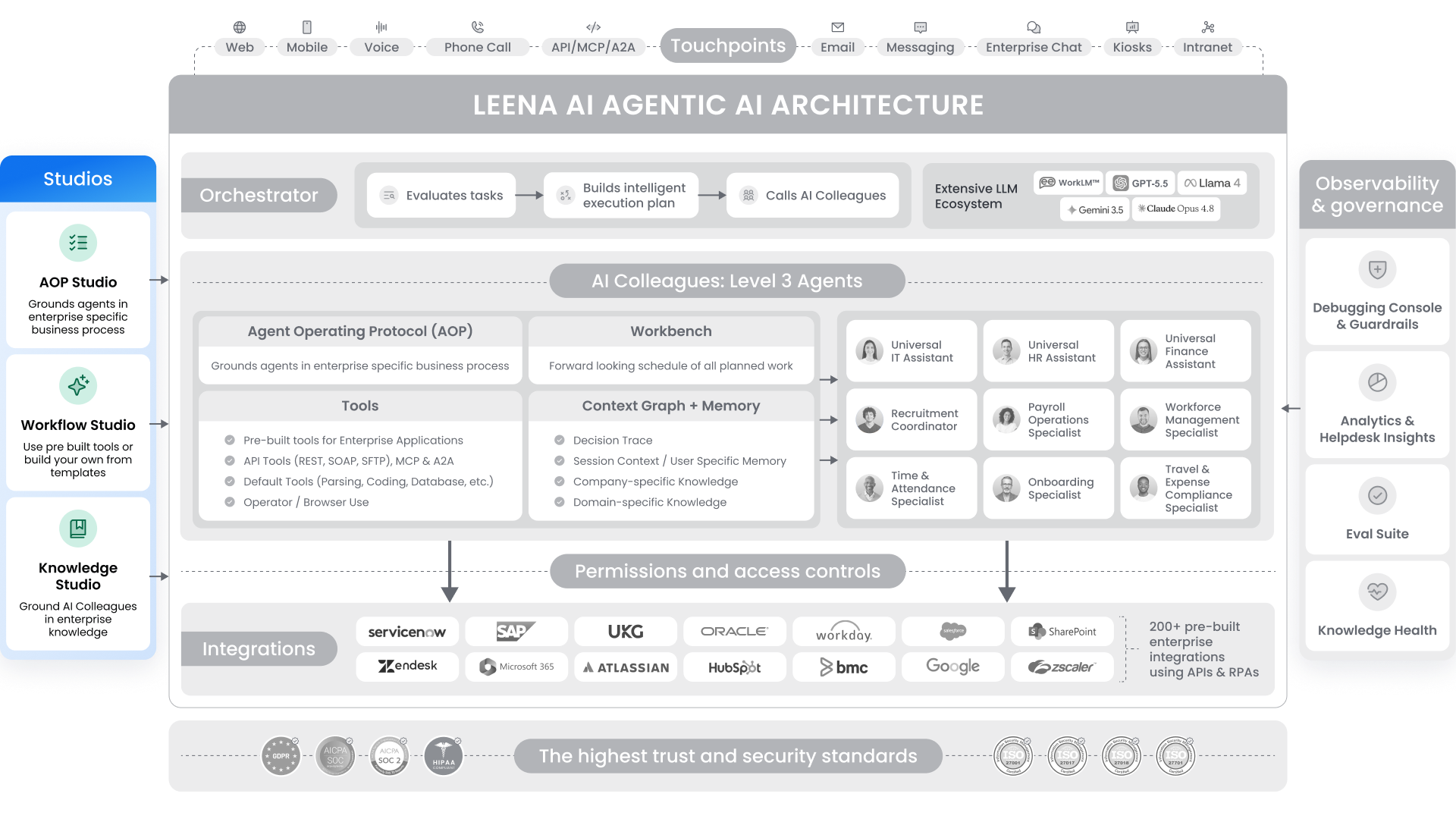
Studios are how the business – not engineering – builds and owns its Colleagues. HR builds HR’s, Finance builds Finance’s. When policy changes, the team that owns the process edits it.
4.1 Workflow Studio
Where deterministic workflows and custom tools are configured. Pre-loaded with 1,000+ tools across 200+ systems, plus templates you adapt. Switch on an integration and its tools come with it. Need a custom action? Build it in a guided form – name, description, examples, scope. No code. The Orchestrator picks it up immediately.
4.2 AOP Studio
Where you write the playbook. Describe the process in plain English or upload an existing SOP – PDF, DOCX, even a flow diagram. The AOP Creator turns it into a numbered procedure and auto-binds the right tools, helper AOPs, and APIs, flagging any gaps. It validates before launch – errors block publish, warnings flag fixes, and you simulate the full run in seconds. Publish, and it’s versioned, audit-logged, rollback-ready. Idea to production in days.
4.3 Knowledge Studio
The grounding layer for Colleagues – not a wiki, not a CMS. It connects every system that holds your real knowledge to the AI working on top of it: SharePoint, ServiceNow KM, Confluence, Box, Drive, data lakes, the open web. Content syncs and indexes centrally, source permissions inherit automatically, and we clean and parse everything – including the tables, images, and metadata most systems drop. Every answer cites the exact passage it came from.
Every RAG system breaks on dirty knowledge. That used to be a year-long consulting project. We made it a technology problem:
- Knowledge Health Dashboard – stale, expiring, conflicting, and mis-permissioned content, surfaced in real time. The quarterly audit becomes continuous.
- Conflict Analysis – flags contradictions (“$5,000 max loan vs. $10,000”) side by side. Up to 1,000 articles per scan.
- Smart Testing – LLM-generated questions grade your bot on accuracy and completeness before users see anything. UAT becomes a dashboard.
- Path-Based Access Control – reads your folder structure (e.g., /Finance/Payroll/US_Managers) and enforces it at query time.
- Content Visibility & Connector Sync – control what’s exposed and how often each source refreshes.
The business acts in days, and the Colleague on top is grounded, not guessing.
5. Observability & Governance – every step visible, every step governed

When AI advises, a bad answer is awkward. When AI acts, a bad step cascades – leaks, compliance hits, regulatory exposure – at machine speed. Regulators have stopped asking whether you have oversight; they’re asking how deep it goes. Gartner expects AI governance to be mandatory under every sovereign AI regulation by 2027.
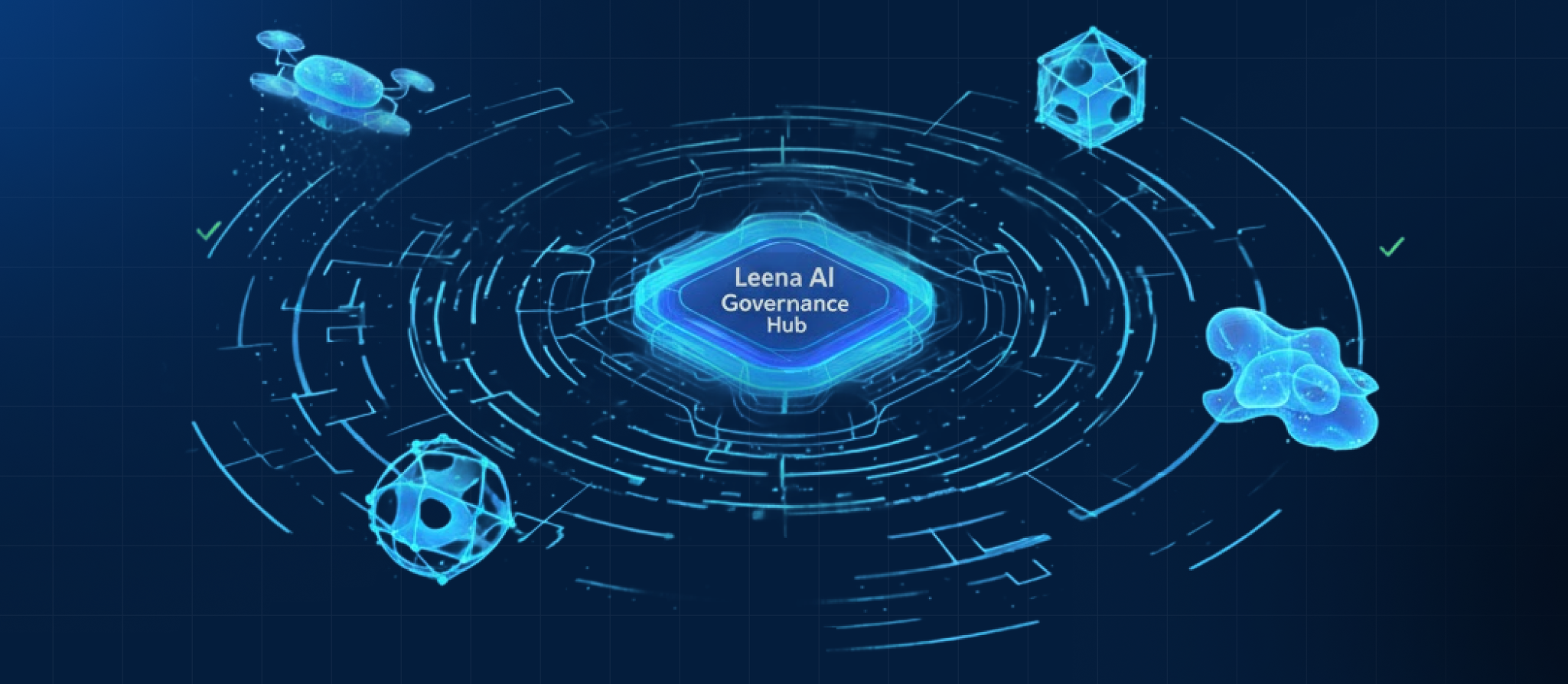
So we made oversight part of the architecture, not a dashboard on the side. Observability shows what a Colleague did; Governance decides what it’s allowed to do. Both ship with every Colleague – no separate edition, no upcharge. Off-policy actions get blocked, not flagged, and every step is logged and replayable.
Four surfaces make it real:
- Analytics & Helpdesk Insights – success/failure rates, handle time, automation vs. handoff, by AOP, team, and region. Plus ticket clustering, auto-drafted KB articles, and step-level cost and latency.
- Eval Suite – validate any AOP before it goes live. Auto-generates test cases (happy path, edge, adversarial) from the AOP’s own config and scores six LLM-judged metrics. Catch the regression before users do.
- Knowledge Health Dashboard – stale, conflicting, and mis-permissioned content caught before agents act on it.
- Debugging Console & Guardrails – turn-by-turn replay of any request, lookup by Request or User ID across every channel. Guardrails enforce PII, moderation, and prompt-injection defense before execution continues. Every violation logged.
Most vendors check policy at the prompt. We enforce at four points – input, plan, tool call, output. And when an auditor asks “why did it do that?”, we show the full reasoning trail, not a final-state log.
6. Permissions & Access Controls – your access model, enforced at runtime
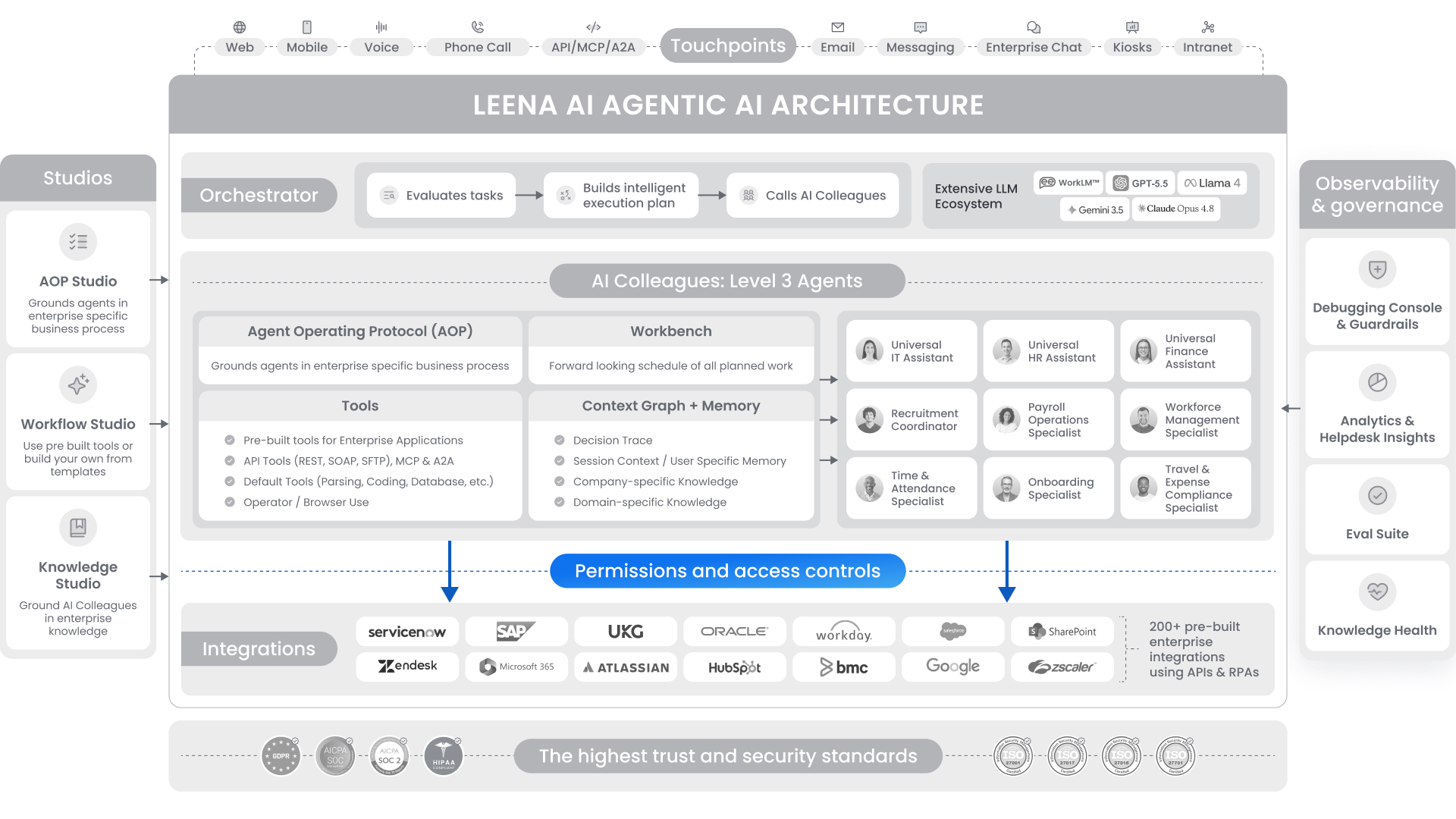
The deep dive beneath Governance. Observability shows what the agent did; this layer is what kept it inside the lines. The principle: if a person can’t see or do it, neither can an agent acting for them. We mirror your real org and reinvent none of it.
- Source permissions, inherited. Plug in SharePoint, Box, ServiceNow, Workday, and 200+ pre-integrated systems – their permissions come along. Lose access there, lose it in Leena on the next sync. No parallel model to drift.
- RBAC that mirrors your org. Directory sync from AD/HRIS. Role-based control at the Colleague, AOP, and tool level – explicit, scoped, auditable.
- Four-layer guardrails at runtime. Model → Colleague config → AOP & execution → system prompts. Checked before a run starts. Out-of-policy actions blocked, not flagged.
- High-risk actions, behind approvals. Record updates, provisioning, scripts – gated by explicit approval or manager-only audiences.
- Tenant isolation by design. Shared cloud, single-tenant, or private VPC, across 14+ regions.
This is the layer that lets a CISO say yes to scaling Colleagues across HR, IT, Finance, and Procurement without multiplying the attack surface. We don’t ask you to trust the agent. We give you the controls – and the proof – to verify it.
7. Integrations – the layer that makes 45 days possible
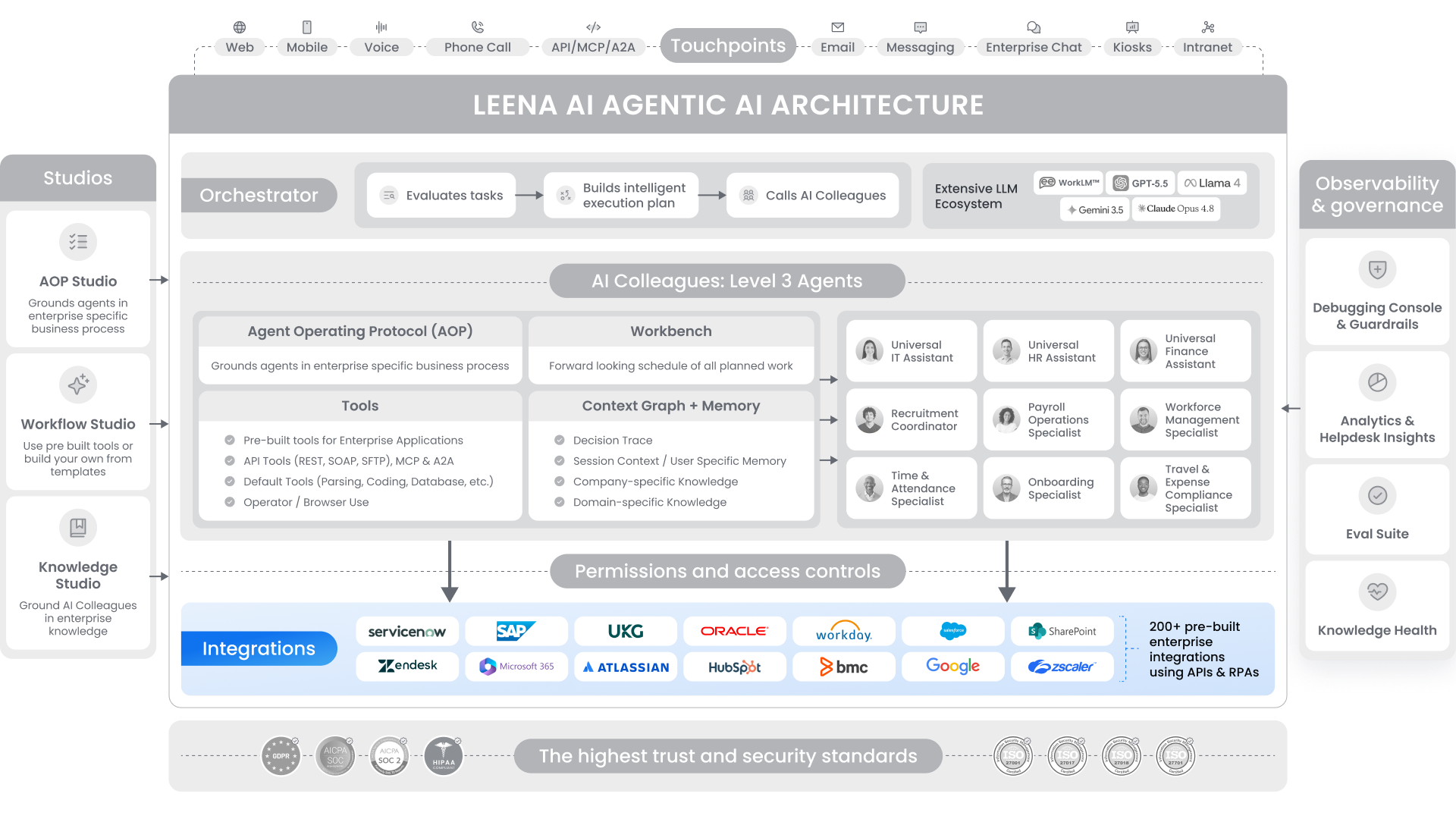
Integrations are where most agentic AI projects quietly die: every new automation becomes its own integration project, and weeks become quarters. We took that off the table. Four things make this layer fast, deep, and durable.
200+ enterprise systems, pre-integrated. We cover the systems of record that matter – Workday, SAP, ServiceNow, Salesforce, Oracle – plus the proprietary backends nobody else touches, with 1,000+ pre-built tools on top. HR, IT, Finance, and Supply Chain, with the cross-category handoffs already solved. This is the single biggest reason a Colleague goes live in 45 days, not a year.
Eight years in production. We were building agentic AI before ChatGPT or Claude existed, across 500+ enterprises – Coca-Cola, Nestlé, Puma, Lafarge Holcim, Sony. APIs change, vendors deprecate, customers customize. We’ve absorbed those failures so your timeline doesn’t.
Vendor-agnostic, on purpose. We integrate with all of these systems and compete with none. No incentive to steer you toward one stack – only to make it work for the one you run.
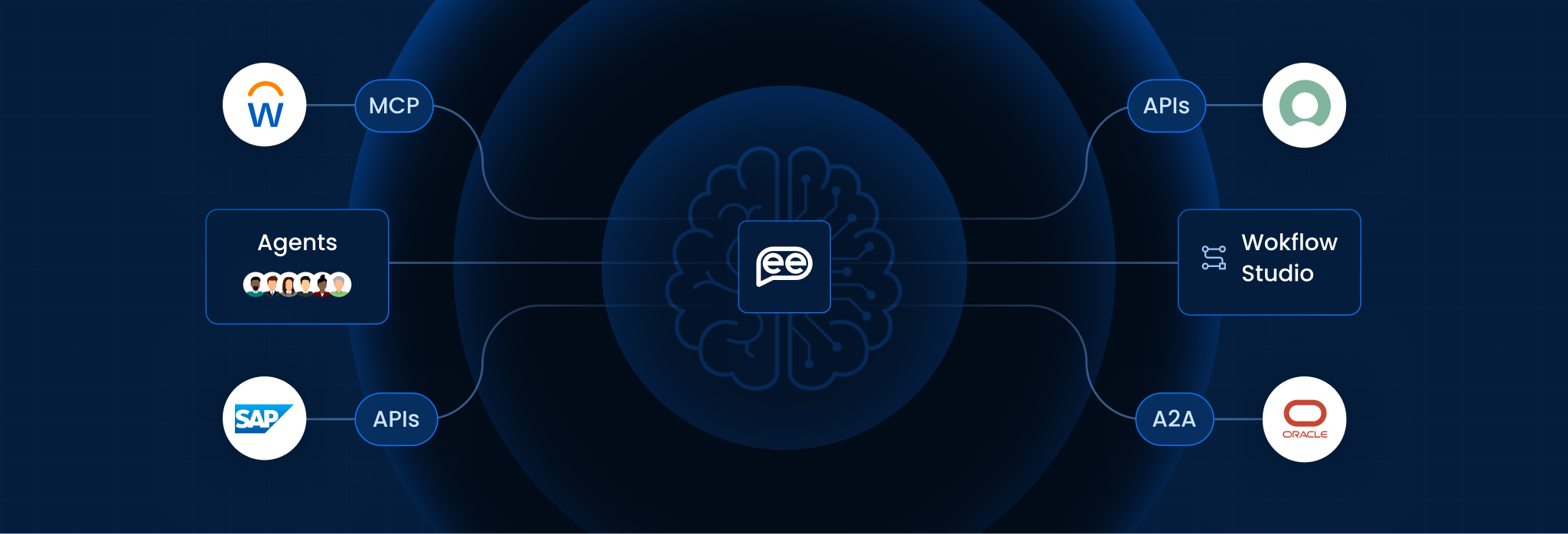
MCP and A2A, native. Any MCP-compatible tool drops into any AOP without a new connector. Won’t MCP flatten the advantage of a big library? It makes connection cheaper, not the decisions. The hard part was never the wire – it’s knowing which workflows survive a real Workday tenant or a twelve-year-old SAP customization.
8. Trust & Security – built in, not bolted on
When AI moves from advising to acting, a mistake stops being reputational and becomes financial, legal, and regulatory. We built for that from day one. The platform assumes it’s handling PII and PHI – encryption, RBAC, logging, and erasure are designed around that, not retrofitted.
- Deterministic execution. AOPs are the rails; tools are validated actions. Same input, same path. Auditors can trace it.
- Enforcement before action. Most platforms log violations. We block them – every action checked by an evaluator LLM before it runs.
- Permissions inherit from source systems, so the AI never becomes a new attack surface for old data.
- Encryption everywhere. AES-256-GCM at rest, TLS 1.2+ in transit, keys via AWS KMS. Data purged on request, erased within a fixed window after termination.
- Identity, SSO, MFA. SAML 2.0 and OAuth with AD, Okta, and others.
- Three deployment models across 14+ regions – multi-tenant, single-tenant, or private VPC. Your call.
- Full decision trace. Every reasoning step, tool call, and document logged. Auditors get the record, not a reconstruction.
Certifications: SOC 1, SOC 2, ISO/IEC 27001/27017/27018/27701, HIPAA, GDPR, CCPA, LGPD, VCDPA, CSA STAR, and FedRAMP Moderate – uncommon among agentic AI vendors, useful near the public sector. Reports live at trust.leena.ai.
We’re not the only vendor that takes security seriously. We’re the one that built it in.
The whole point
Pull the eight layers together and you get something simple to say and hard to build: AI Colleagues that do real work across your stack, stay grounded in your knowledge and precedent, and never step outside the lines your org already drew – with a full record of every move.
And they do it on a 45-day clock. Pre-integrated systems, plain-English AOPs, pre-indexed knowledge, governance from the start – every layer exists to close the gap between “we want this” and “it’s in production.” Most of the category treats speed and safety as a trade-off. We built an architecture where you don’t choose.
Autonomy on rails. Speed with proof. Live in 45 days.
Ready to see it run? Book a personalized demo → Read the docs at docs.leena.ai
Frequently Asked Questions
How many integrations and connectors does Leena AI have?
200+ enterprise systems pre-integrated and 1,000+ pre-built tools (the atomic actions Colleagues take inside them). Pre-built connectors span HR, IT, Finance, and Supply Chain – Workday, SAP, ServiceNow, Salesforce, Oracle, and more – and new connectors are built when you need one we don’t cover.
How long does it take to go live?
45 days. Pre-integrated systems, pre-built connectors, plain-English AOPs, pre-indexed knowledge, and built-in governance compress deployment from the usual six-to-eighteen-month engagement down to weeks.
Which LLM does Leena AI use?
Leena is model-agnostic. The Orchestrator runs on any frontier model – GPT-5.5, Claude Opus 4.7, Gemini 3.5, Llama 4, Grok 4.3, or our proprietary WorkLM – and adopts newer ones as they ship. The enterprise expertise lives in the architecture, not one model.
What is an AOP?
An Agent Operating Protocol – the playbook a Colleague executes, like an SOP for a human. Write it in plain English or upload an SOP, and the AOP Creator turns it into a governed, production-ready procedure.
What's the difference between a Tool and a connector?
A connector links Leena to a system (say, Workday). A Tool is a specific validated action through it (fetch a leave balance, file a ticket). Turn on a connector and its Tools come with it.
Is Leena AI secure and compliant?
Yes. SOC 1, SOC 2, ISO/IEC 27001/27017/27018/27701, HIPAA, GDPR, CCPA, and FedRAMP Moderate, with three deployment models across 14+ regions. Reports at trust.leena.ai.
How do agentic AI workflows specifically improve the employee experience?
Agentic AI workflows improve the employee experience by making interactions with company systems seamless and intuitive. Instead of employees needing to know which system to use for a specific task (e.g., requesting leave, resolving an IT issue), the Agentic AI, guided by its workflows, handles these processes behind the scenes. This means employees get their tasks done quickly and easily, reducing frustration and allowing them to focus on their core responsibilities.




2 Comments