Introduction
In the world of enterprise AI, there is a massive gap between “following the rules” and “getting the job done.”
Traditional automation follows rigid workflows. If a process deviates even slightly, like an invoice missing a Purchase Order number or a new hire needing non-standard equipment, the automation breaks and dumps the problem back onto a human. But human employees don’t break; they learn. They know that this specific vendor is a utility company and doesn’t need a PO, or that the specific design role needs a MacBook instead of a standard PC.
This accumulation of exceptions, decisions, and nuances is referred to as Context.
At Leena AI, we have moved beyond static “Standard Operating Procedures” (SOPs) to create AI Colleagues that utilize Agentic Operating Protocols (AOPs), equipped with a Context Graph (earlier known as Run Context Memory), a concept refined by Foundation Capital. This allows our agents to build a dynamic memory of how your business actually runs, rather than just how the manual says it should.
What is a Context Graph?
A Context Graph is a living, queryable decision map that captures:
- What happened (the exception or scenario)
- What decision was made
- Why it was made (the rationale)
- Who approved it
- When it applies again (conditions/thresholds/precedences)
- Which systems and artifacts were involved (tickets, invoices, approvals, emails, etc)
Think of it as the missing layer between:
- Static enterprise knowledge (policies, KB articles, SOPs), and
- Operational truth (what teams actually do in edge cases).
AOPs vs. Context Graphs (how they work together)
Agent Operating Procedures (AOPs) are the baseline playbook—the intended, repeatable way your organization wants a process to run. They’re the agent equivalent of SOPs: step-by-step procedures like “match invoice → validate PO/contract → route approvals → post to ERP → schedule payment.” AOPs define the happy path, guardrails, required approvals, and how to escalate when something doesn’t fit the procedure.
A Context Graph is what gets created when reality deviates from that playbook. It captures the exceptions, precedences, and rationale that emerge in day-to-day operations—like “utility bills under $1,000 don’t require a PO” or “grant temporary restricted access for Day 1 under these constraints.”
In short: AOPs define how work should run; Context Graphs capture how work actually got resolved when it didn’t fit the script. Over time, Context Graph precedents can be reviewed, governed, and (when appropriate) promoted into the AOP as an explicit policy—making the baseline playbook smarter without losing auditability.
How a Context Graph gets built
Here’s the key mechanism:
AI Colleagues don’t silently learn. They learn explicitly.
When a scenario deviates from the baseline rule/process, the AI:
- Detects an exception or ambiguity
- Escalates to a human manager/approver
- Asks for:
- the decision and
- the reason, plus whether it is:
- a one-time exception, or
- a repeatable precedence
- Writes the decision trace into the Context Graph with applicability conditions
This creates a compounding system: each resolved exception reduces future escalations, speeds up execution, and improves consistency.
What’s inside the Context Graph?
A practical way to think about it:
Nodes (things)
- Exceptions (Missing_PO, Training_Not_Completed, Policy_Conflict, Vendor_Risk, etc.)
- Decisions (Approve, Hold, Route_For_Review, Allow_NonPO, Allow_TempRestrictedAccess, etc.)
- Rules/Precedences (UtilityBillsNoPOUnder1k, QuarterCloseOverride, TempAccess72h, etc.)
- Actors (AI, manager, approver, budget owner)
- Systems (SAP, Coupa, Workday, Okta, ServiceNow, Teams/Slack, Email)
- Artifacts (Invoice ID, Contract ID, Ticket ID, approval record)
Edges (relationships)
- triggered_by, resolved_by, approved_by
- applies_to, requires_condition, has_threshold
- justified_by (the “why”)
- overrides (precedence over a baseline rule)
The result is structured memory, not chat history.
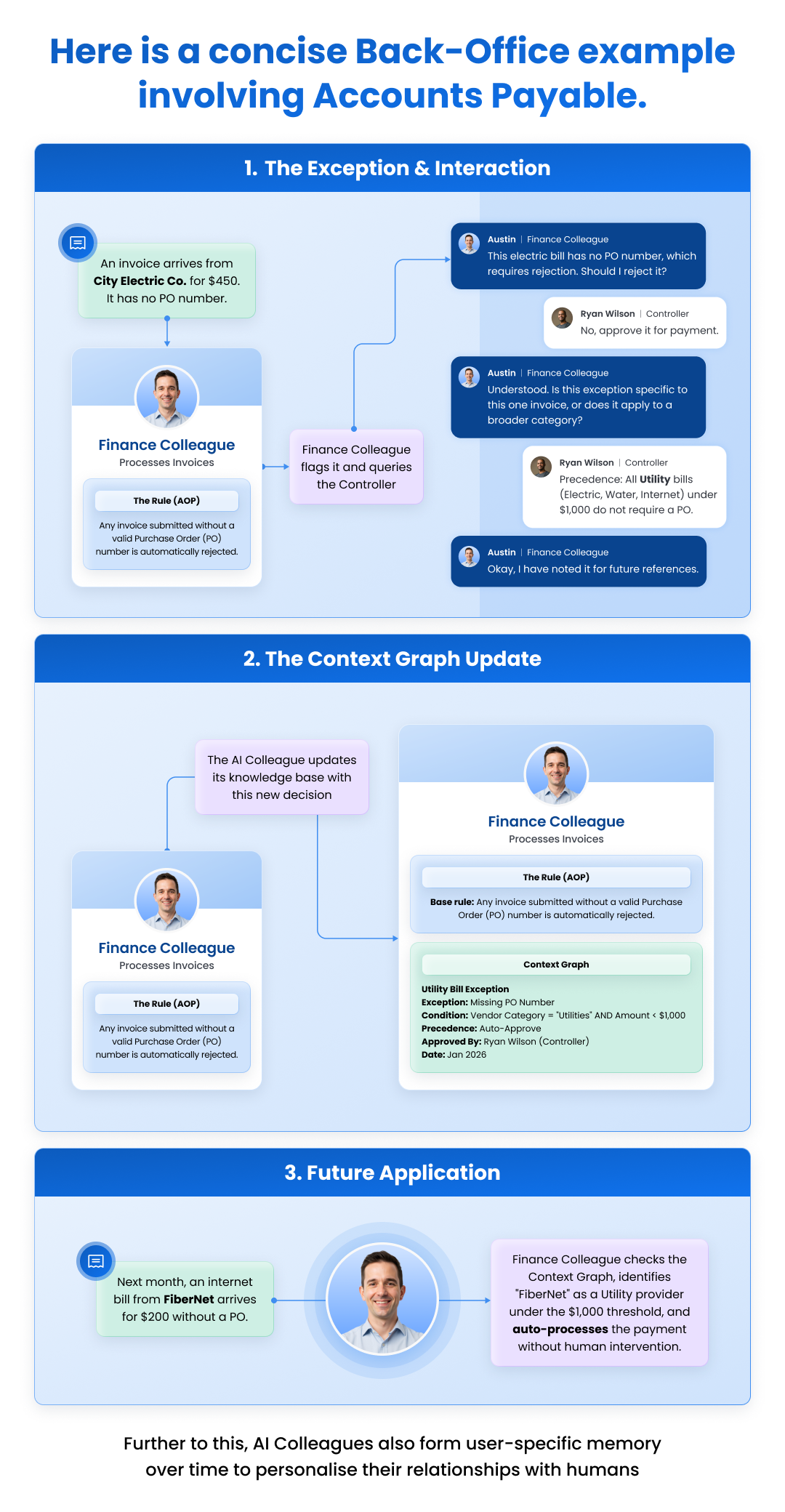
Example 1: Accounts Payable precedent (Utilities without PO)
Baseline rule: Any invoice without a valid PO number is rejected.
Exception: An electric bill arrives for $450 with no PO.
The AI escalates:
- AI: “No PO found. Baseline says reject. Should I reject it?”
- Controller: “No, approve it.”
- AI (explicit learning): “Is this a one-time exception or a repeatable precedent?”
- Controller: “Precedence: Utility bills (electric, water, internet) under $1,000 do not require a PO.”
Context Graph writes:
- Exception: Missing_PO
- Condition: VendorCategory=Utilities AND Amount < 1000
- Precedence: Auto-Approve
Next month: An internet bill comes in for $200 with no PO → auto-processed without escalation.
Example 2: HR + IT onboarding precedent (Workday + Okta + ServiceNow + Slack/Teams)
AI Colleague: Nova (Onboarding Colleague)
Baseline process: “Create employee → provision accounts → assign equipment → grant app access → confirm Day-1 readiness”
1) Normal flow starts
A new hire is marked “Hired” in HRIS.
- Employee: Priya Shah
- Role: Data Analyst
- Start date: Monday
- Manager: VP Analytics
- Location: Remote (US)
Nova begins onboarding:
- Creates an identity record
- Opens IT onboarding ticket(s)
- Preps app access bundle for the role
2) Exception occurs (policy conflict)
Nova detects the role requires access to Snowflake + Salesforce, but the standard policy says:
Baseline rule: “No production-data access until completion of Security Training.”
Priya’s manager pings in Slack/Teams:
“Priya needs Snowflake access on Day 1 for a customer deliverable. Can you make it happen today?”
3) The AI asks for a decision + reason (explicit learning)
Nova escalates:
“Baseline policy: Production access requires Security Training completion.
Decision needed: Do we (A) wait for training, or (B) grant time-bound restricted access?
If B, what’s the rule (conditions + duration) so I can apply it consistently next time?”
Security/HR approves with constraints:
“Grant restricted access for Day 1 if:
(1) Manager is VP+ and explicitly approves
(2) Access is read-only and limited to non-sensitive datasets
(3) Access auto-expires in 72 hours unless training is completed
Reason: Avoid delaying onboarding productivity while maintaining risk controls.”
Nova provisions:
- Okta group: Snowflake_ReadOnly_NonSensitive_Temp72h
- ServiceNow change record referencing manager approval
- A follow-up task: “Revoke temp access if training not completed by expiry.”
- A reminder to the new hire to complete training
4) What gets written into the Context Graph (decision trace)
Nova stores the precedent as a structured, reusable context:
- Exception: Training_Not_Completed
- Decision: Allow_TempRestrictedAccess
- Rule/Precedence:
- manager_level ≥ VP
- access_scope = read-only + non-sensitive
- TTL = 72h auto-expire
- must_create = audit/change record
- Rationale: Balance Day-1 productivity with security posture
- Actors: Nova (AI), Security approver, Hiring manager
- Systems: Workday/HRIS, Okta, ServiceNow, Slack/Teams
- Artifacts: employee record, approval message, change record ID
5) Next time, the Context Graph makes onboarding faster
Two weeks later, another new hire needs Day-1 access with training incomplete. Nova recognizes the same exception class and proposes the precedent:
“Training incomplete. Applying prior precedent: VP+ approval + read-only non-sensitive + 72h expiry + audit record. Proceeding unless you want to override.”
If anything differs (non-VP approver, request for write access, sensitive data), Nova escalates again—and that new decision becomes another node/precedent in the Context Graph.
Future of Context Graphs: Extraction from Slack/Email/logs
Over time, organizations want “tribal knowledge” to become governed precedent.
Example: CFO posts in Slack:
“During quarter-close week, prioritize payments for strategic vendors even if PO is delayed—avoid service disruption.”
When collaboration and system signals are ingested, that becomes a precedence rule node like:
- QuarterClose_Precedence: StrategicVendorPayments > PO_Delay_Hold
- Conditions: quarter-close window + vendor tier=strategic
- Rationale: service disruption risk
Now the AI doesn’t just “remember” — it can apply the rule consistently, log its usage, and keep it auditable.
Why Context Graphs matter for enterprises
1) Consistency at scale
Two humans handle exceptions differently. A Context Graph makes decisions repeatable based on precedent + conditions.
2) Fewer escalations over time
Every resolved exception becomes a reusable rule, reducing future human involvement.
3) Auditability and trust
Decisions are stored with who approved, why, and what conditions triggered it—so it’s inspectable, not magical.
4) Faster evolution than hardcoded workflows
Instead of rewriting workflows every time nuance appears, the system accumulates precedences that layer over baseline rules.
Conclusion
From “agents that answer” to “Colleagues that improve execution”
Agentic AI in the enterprise isn’t just reasoning. It’s execution under constraints across messy systems while handling edge cases the way your best operators do.
A Context Graph is the compounding advantage that turns daily exceptions into reusable operational intelligence so AI Colleagues get faster, safer, and more consistent over time.
Want To Know More?
Book a Demo