


AI Powered Chatbot Strategy: Solving “Bot Fatigue” & The Widget War
The Failure Scenario: The “Widget War” on the Intranet
It is open enrollment week, 2026. An employee needs to update their dependent status and check their new deductible. They log into the corporate intranet and are immediately greeted by the “Widget War.”
In the bottom right corner, the ServiceNow IT bot is flashing a notification about a password expiry. In the bottom left, the Workday HR bot is bouncing to remind them about enrollment. A pop-up from the Salesforce Sales Ops bot is asking for a forecast update.
The employee types: “Add my new daughter to my insurance.”
They mistakenly type this into the IT bot because it was the first one to pop open.
The IT bot replies: “I do not understand. Would you like to reset your password?”
Frustrated, the employee closes all three widgets and sends an email to the HR Director, bypassing the $5 million automation stack entirely. This is Bot Fatigue. The failure is not that the artificial intelligence chatbot technology is broken; it is that the user experience is fragmented across 15 different vendors fighting for screen real estate.
AI Powered Chatbot — Why This Fails at Scale
The root cause of Bot Fatigue is the SaaS “bundling” model. Every software vendor from ERP to CRM to ITSM now bundles a “free” ai chatbot for business with their license.
Why the Experience Fragments:
- Siloed Context: The chat bot AI for travel (Concur) knows your flight schedule but doesn’t know your cost center code, which lives in the Finance bot (Oracle).
- Competing Entry Points: Each vendor wants to be the “primary” interface. They build “sticky” widgets that resist being hidden, cluttering the employee workspace.
- Inconsistent Syntax: The HR bot requires natural language (“I need a day off”), while the legacy Supply Chain bot requires command-line syntax (/check-inventory sku-123).
The Cost of Fragmented Interfaces
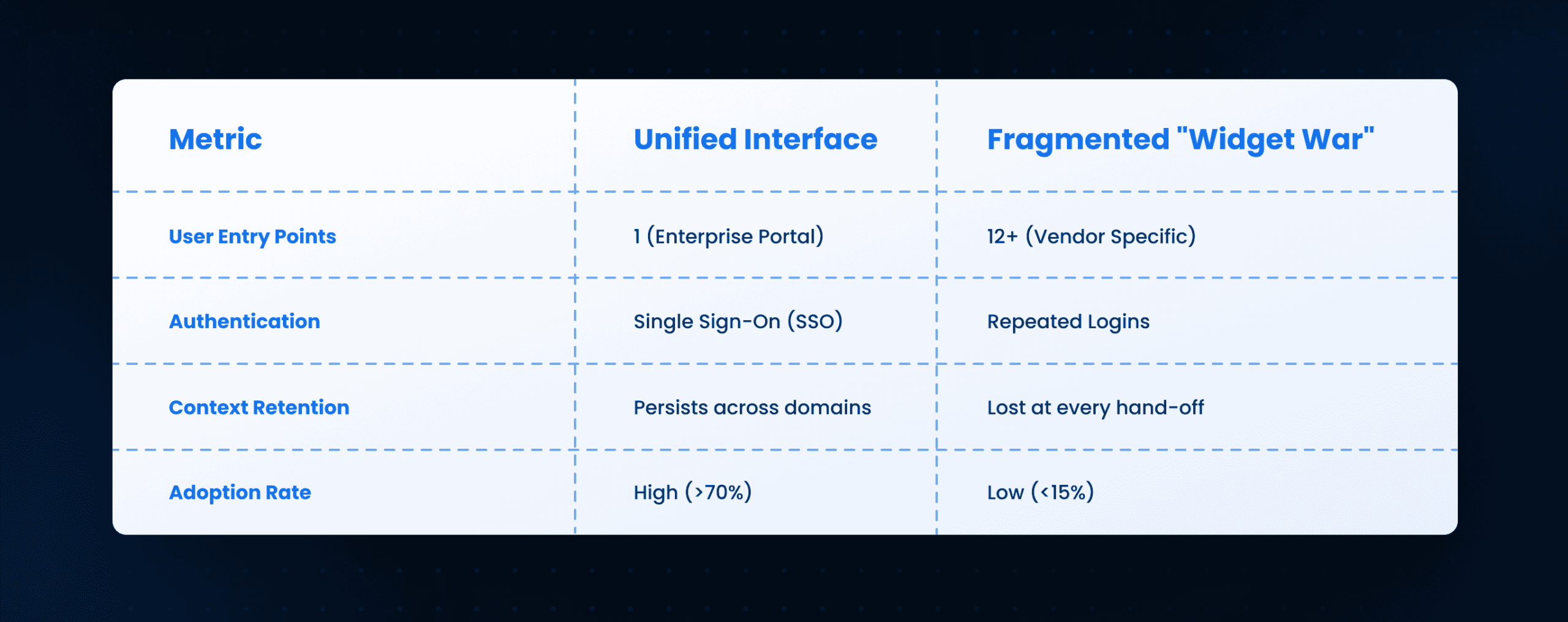
Operationalizing the Unified Interface
To solve this, the CIO must mandate a “Headless Bot” strategy. You cannot allow every vendor to deploy their own UI. You must strip the UI layer from the ai chatbots and route all traffic through a single, enterprise-controlled orchestration layer.
Step 1: The Inventory Audit
- Identify every active ai chatbot top vendor running in the environment.
- Classify them as “System of Record” (Backend) vs. “System of Engagement” (Frontend).
- Mandate: If a vendor bot cannot function via API (headless), it is deprecated.
Step 2: The Orchestration Layer
This layer acts as the “Traffic Controller.” It sits between the user and the 15 backend ai powered chatbots.
- Ingest: User types “I need to book travel to London and charge it to Project X.”
- Split Intent: The orchestrator splits this into two tasks.
- Book Travel -> Routed to Travel Bot.
- Charge Project -> Routed to Finance Bot.
- Synthesize: The orchestrator combines the two responses into one clean answer.
Dependencies:
- Middleware: An integration platform (MuleSoft/Workato) to handle API calls.
- Semantic Router: A classification model that detects intent with >95% accuracy.
Failure Points:
- Latency: The “double-hop” (User -> Orchestrator -> Vendor Bot) adds delay. If the total response time exceeds 3 seconds, users abandon the chat.
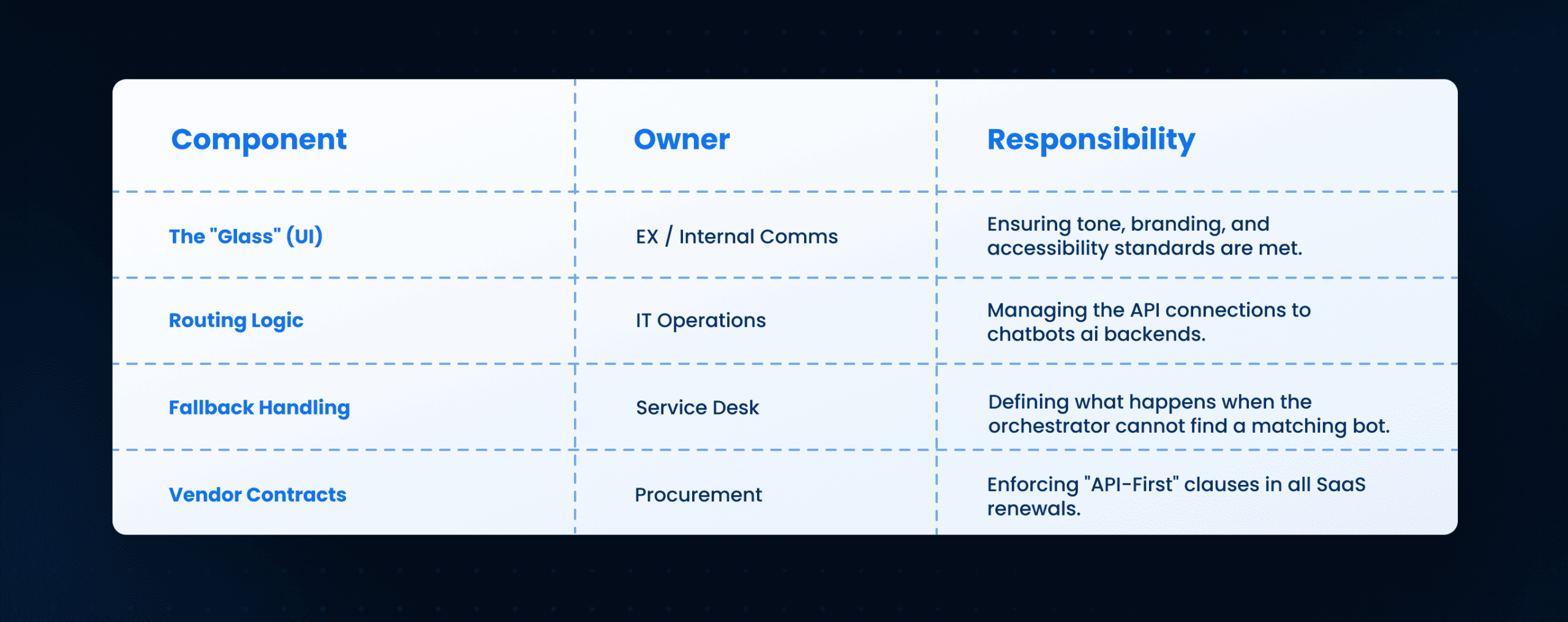
Governance: Owning the “Glass”
When you unify the interface, you take ownership of the “Glass” (the screen the user sees). This shifts the liability from the vendor to the Enterprise IT team.
Ownership & Governance of the Unified Layer
Managing Artificial Intelligence Chat Bots Data Privacy
In a unified model, the orchestrator sees everything.
- Risk: PII (Personal Identifiable Information) from an HR query could accidentally be passed to a less-secure IT bot log.
- Control: Implement a “Redaction Middleware” that strips SSNs and salaries before routing the query to any downstream ai chat bots.
Scaling Limits: When Orchestration Breaks
Unifying artificial intelligence chat bots works well for top-level triage, but it has scaling limits.
1. The “Deep-Link” Limit
If a user needs to perform a highly complex task (e.g., “Reconfigure the SAP supply chain logic”), the orchestrator should not try to handle it via chat.
- Rule: If the conversation exceeds 5 turns, the bot should push a “Deep Link” that opens the native SaaS application (e.g., SAP GUI) for the user to finish the task.
2. The “Tone” Clash
The HR bot is programmed to be empathetic. The IT bot is programmed to be terse. When their answers are combined, the tone can feel schizophrenic.
- Solution: Use a lightweight LLM in the orchestrator to “rewrite” all backend responses into a consistent enterprise voice.
How Leena AI Operationalizes This
At Leena AI, we function as the Unified Orchestration Layer. We end the “Widget War” by providing a single, intelligent interface that connects to all your backend systems.
Our Operational Approach:
- Universal Connector: We integrate with your existing ai chatbot vendors (ServiceNow, Workday, etc.) in headless mode.
- Context Persistence: We maintain the user’s identity and context. If a user asks Leena AI about “my team,” we know who their team is because we pulled it from the HR system, even if the user is currently asking an IT question.
- Smart Deflection: We stop the “ping pong” effect. If the backend bot fails, we seamlessly escalate to a human agent within the same chat window, preserving the history.
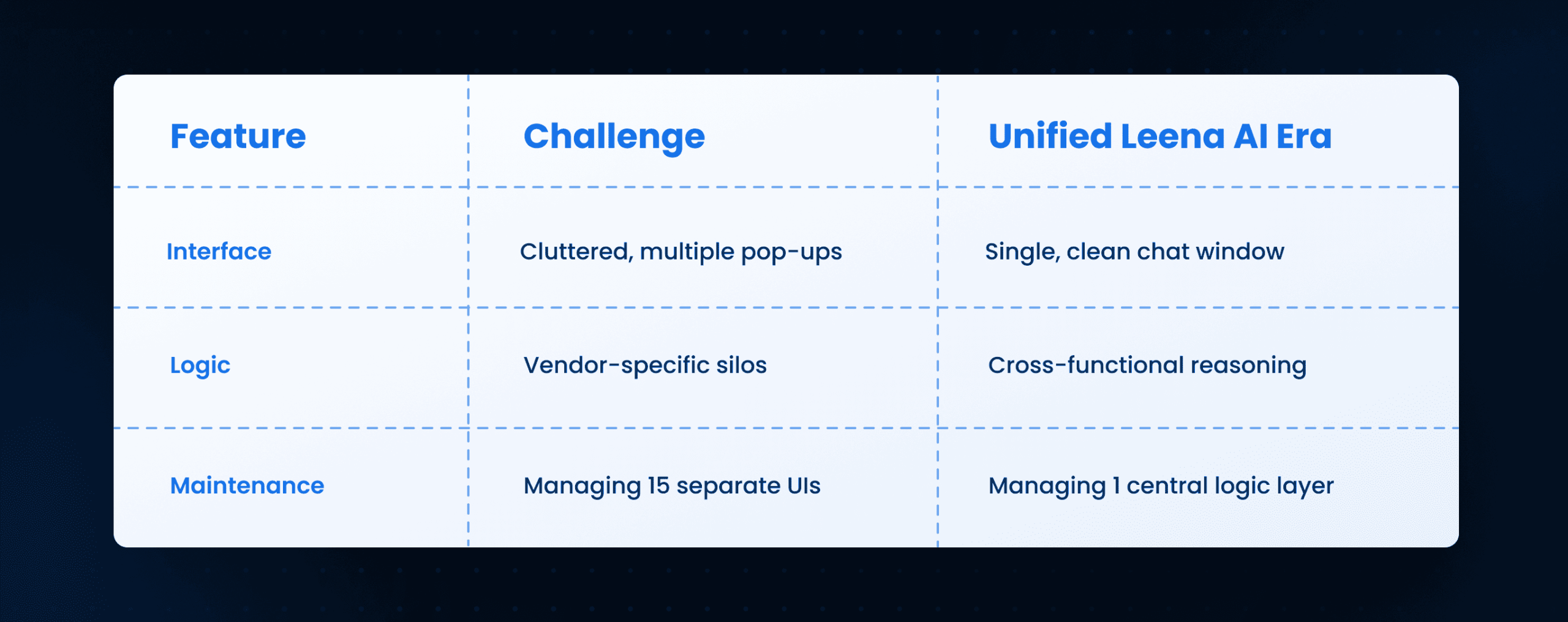
Conclusion: Execution Outcomes
The “Widget War” is destroying the ROI of your automation investments. Employees will not navigate a maze of 15 different ai powered chatbots.
Monday Morning Next Steps:
- Audit the Screen: Open your intranet and count the number of chat widgets. If it is >1, you have a problem.
- Define the “Super-Intent”: Identify the top 5 questions that cross domains (e.g., “Onboarding” involves IT, HR, and Security).
- Pilot Headless Mode: Ask your top vendor (e.g., ServiceNow) for their API documentation to run their bot without their UI.
Reclaim the screen. Give your employees one conversation, not fifteen.
Frequently Asked Questions
What is an ai powered chatbot orchestration layer?
It is a “Traffic Controller” software that sits between the employee and your various backend systems. It takes the user’s question, decides which backend system can answer it, and routes the request instantly.
Why not just use the ai chatbots provided by our vendors?
Vendor bots are siloed. They force employees to know which tool solves which problem. A unified strategy removes this cognitive load, boosting adoption and satisfaction.
Does this require replacing our existing artificial intelligence chatbot tools?
No. You keep the backend logic (the “brains”) of your Workday or ServiceNow bots. You only replace the frontend “chat widget” with the unified interface.
How do we handle latency in a unified aichatbot architecture?
You must monitor API response times. If a vendor bot takes longer than 2 seconds to respond, the orchestrator should display a “Thinking…” animation or fallback to a cached answer to keep the user engaged.
Can an ai chatbot for business really understand all departments?
Yes, if it uses “Intent Routing.” The unified bot doesn’t need to know everything; it just needs to know who knows everything (e.g., “This is a tax question -> send to Finance Bot”).
What is the risk of unifying ai chat bots?
The main risk is a “Single Point of Failure.” If the orchestrator goes down, all chat channels go down. You need high-availability redundancy for this layer.



